Rust in Visual Studio 2022
As far as we know in November 2026, Visual Studio 2022 has no Rust workload from Microsoft: Rust support in it comes from community extensions. What Visual Studio does provide is the C++ build tools that Rust’s MSVC toolchain links with. Most Rust developers on Windows use an editor built around rust-analyzer instead, such as VS Code, RustRover or Ruststudio, a free native Rust IDE.
Updated · describes Ruststudio 0.1.7
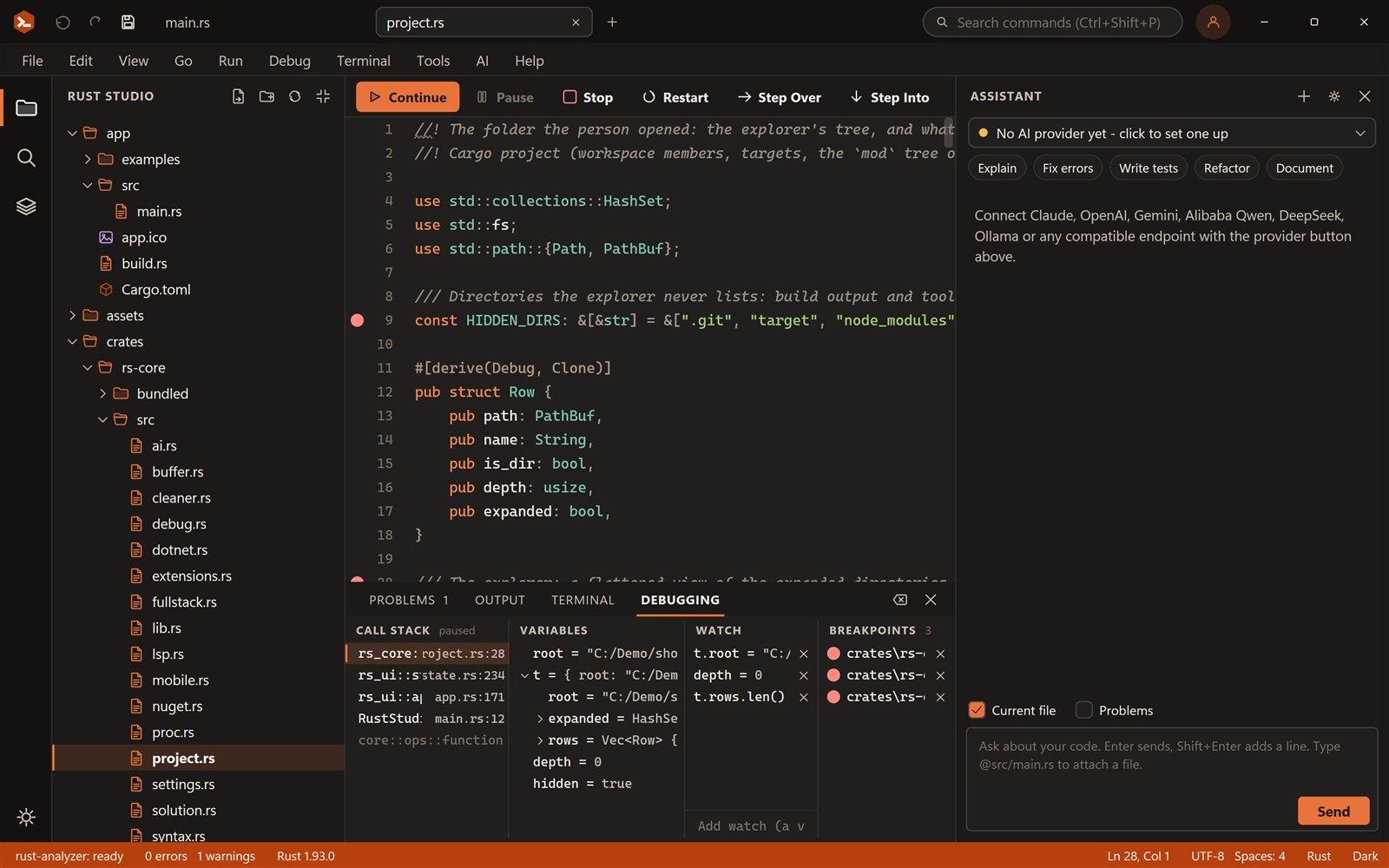
Developers who know Visual Studio from C# or C++ often look for Rust in it. Here is an honest account of what works there, how it differs from Visual Studio Code, and what to use if you want the same kind of IDE for Rust.
Rust in Visual Studio, VS Code and Ruststudio
| What it is | Microsoft’s full IDE for .NET and C++ | A general-purpose editor with extensions | A native IDE made only for Rust |
|---|---|---|---|
| Rust code intelligence | Through community extensions; no Microsoft workload that we know of | The rust-analyzer extension | rust-analyzer, built in |
| Build and run | Through an extension, or cargo in a terminal | Cargo through extensions and tasks | Cargo on F5 and the toolbar, with a Problems panel |
| Debugging Rust | Its debugger can read the PDB symbols of a program built with the MSVC toolchain | Through a debugger extension | Built in (lldb-dap): breakpoints, stepping, threads, watches |
| Projects | Solutions (.sln) for .NET and C++ | Folders and workspaces | Solutions (.rssln) that hold many Rust projects |
| Its part in Rust on Windows | Its installer provides the Microsoft C++ build tools | None; an editor only | Can run rustup for you during installation |
| Cost | See Microsoft’s editions | Free | Free for personal and commercial use |
What works for Rust in Visual Studio 2022
Visual Studio 2022 is built around .NET and C++. Rust is not one of the languages it installs: to edit Rust in it you add a community extension from the Visual Studio Marketplace that connects rust-analyzer, and how complete that is depends on the extension. We do not know of a Rust workload from Microsoft as of November 2026; check Microsoft’s documentation for the current state.
Two things do work well. First, the Visual Studio installer is the usual source of the Microsoft C++ build tools, which Rust’s default Windows toolchain needs for linking. Second, because that toolchain writes standard PDB debug symbols, the Visual Studio debugger can open and step through a Rust program.
Visual Studio vs Visual Studio Code for Rust
The names are close, the products are not. Visual Studio Code is a separate, free editor, and it is the most common place to write Rust: the rust-analyzer extension gives it completion, errors and navigation, and a debugger extension adds breakpoints. So when a guide says “Rust in VS Code”, it does not mean Visual Studio 2022.
- Visual Studio 2022: a full IDE, no built-in Rust that we know of
- Visual Studio Code: an editor, Rust through the rust-analyzer extension
- Either way, Rust itself is installed separately with rustup
Do I need Visual Studio to build Rust on Windows?
You need its build tools, not the IDE. The default Rust toolchain on Windows (MSVC) uses Microsoft’s linker and libraries. rustup-init offers to install them, or you can install the “Desktop development with C++” workload, or the stand-alone Build Tools, from the Visual Studio installer. The alternative is Rust’s GNU toolchain, which does not use them.
A Visual Studio-style IDE for Rust
If what you miss is the Visual Studio way of working, Ruststudio was made for it. It is a native Windows program (also for macOS and Linux), free for personal and commercial use, with the same debugging keys: F5 to start, F9 for a breakpoint, F10 and F11 to step, Shift+F11 to step out. A solution holds many projects with a startup project and Debug or Release, and there are views for NuGet packages as well as Rust crates.
It is not Visual Studio and does not load Visual Studio extensions or .sln files. It is closed-source freeware, and it handles Rust only.
- Solutions (.rssln) with a startup project and Debug and Release
- A debugger with call stack, locals, watches, threads and an Immediate window
- Pack a Rust library as a NuGet package for a C# project
- Installs per user, with no administrator rights
- A free Rust IDE for Windows What Ruststudio does on Windows 10 and 11
- Use Rust from C# and .NET Pack a Rust library as a NuGet package
Frequently asked questions
Something else? Ask in the community forum or send feedback.
Does Visual Studio 2022 support Rust?
Not out of the box, as far as we know in November 2026. There is no Rust workload from Microsoft in the Visual Studio installer; Rust editing comes from community extensions. Check Microsoft’s documentation for the current state.
Can I use Rust in Visual Studio?
You can edit Rust with a community extension and build with cargo, and the Visual Studio debugger can read the debug symbols of a Rust program built with the MSVC toolchain. Most people use an editor with rust-analyzer instead.
Is Rust in Visual Studio Code the same as Rust in Visual Studio?
No. Visual Studio Code is a different, free editor, where the rust-analyzer extension provides Rust support. Visual Studio 2022 is Microsoft’s full IDE for .NET and C++.
Do I need Visual Studio 2022 to install Rust?
No, only the Microsoft C++ build tools, which the Visual Studio installer provides and which rustup-init offers to install. The Visual Studio IDE itself is not needed.
Can I debug Rust in Visual Studio?
A Rust program built with the MSVC toolchain has PDB symbols, which the Visual Studio debugger can read, so breakpoints and stepping are possible. How Rust types are displayed depends on the debugger’s visualisers.
Is there an IDE like Visual Studio for Rust?
Ruststudio is a free, native Rust IDE with solutions, a startup project, Debug and Release, and the F5, F9, F10 and F11 debugging keys. JetBrains RustRover is a commercial IDE for Rust that is free for non-commercial use.