Tauri 2
Web UI, Rust core
A Tauri 2 starter with a static front end and a Rust command, for apps that want HTML for the interface.
Start a Tauri, Slint or egui desktop app from a template, keep it in a solution with your libraries, and run, test and package it from one place.
Pick a web, desktop, mobile or library template, name it, and see the files it creates. Extensions add more.
my-app.rssln
Try it: filter by category, pick a template, rename the project, and switch the extension on to add a template from it.
Add projects, choose the startup project and the configuration, and watch the solution file follow.
Run starts shop-app in Debug. Build covers all 2 projects.
shop.rssln
# Rust Studio solution. Projects are Cargo packages; the workspace Cargo.toml beside this file is generated from this list.
[solution]
name = "shop"
version = 1
startup = "shop-app"
configuration = "debug"

[[project]]
name = "shop-core"
path = "crates/shop-core"
kind = "library"

[[project]]
name = "shop-app"
path = "crates/shop-app"
kind = "application"
Cargo.toml (kept in sync)
# Managed by Rust Studio from the .rssln solution file. Add projects through the solution, not here.
[workspace]
resolver = "3"
members = [
    "crates/shop-core",
    "crates/shop-app",
]
Try it: add a web server, make it the startup project, switch to Release, and watch the solution file change.
Tauri 2
A Tauri 2 starter with a static front end and a Rust command, for apps that want HTML for the interface.
Slint
The Slint template runs as a Windows program with cargo run and is ready for Android too.
egui
The egui template is a small, fast native window you can grow into a tool.
Libraries
Put business logic in a library project inside the solution, and use it from the desktop app and a command-line tool.
Extensions
An extension adds project templates for any UI toolkit or SDK, with its own settings, without changing Rust Studio.
NuGet
Restore native libraries and SDKs from NuGet into your solution and link them from build.rs in one click.
Learn more →Pick a template, press F5, and a native window opens. Because Rust Studio builds in the background at a lower priority, your desktop stays responsive while cargo compiles, and the toolbar shows what is running and how long it took.
Switch between Debug and Release from the toolbar, set run arguments and environment variables per project, and keep several apps and libraries in one solution.
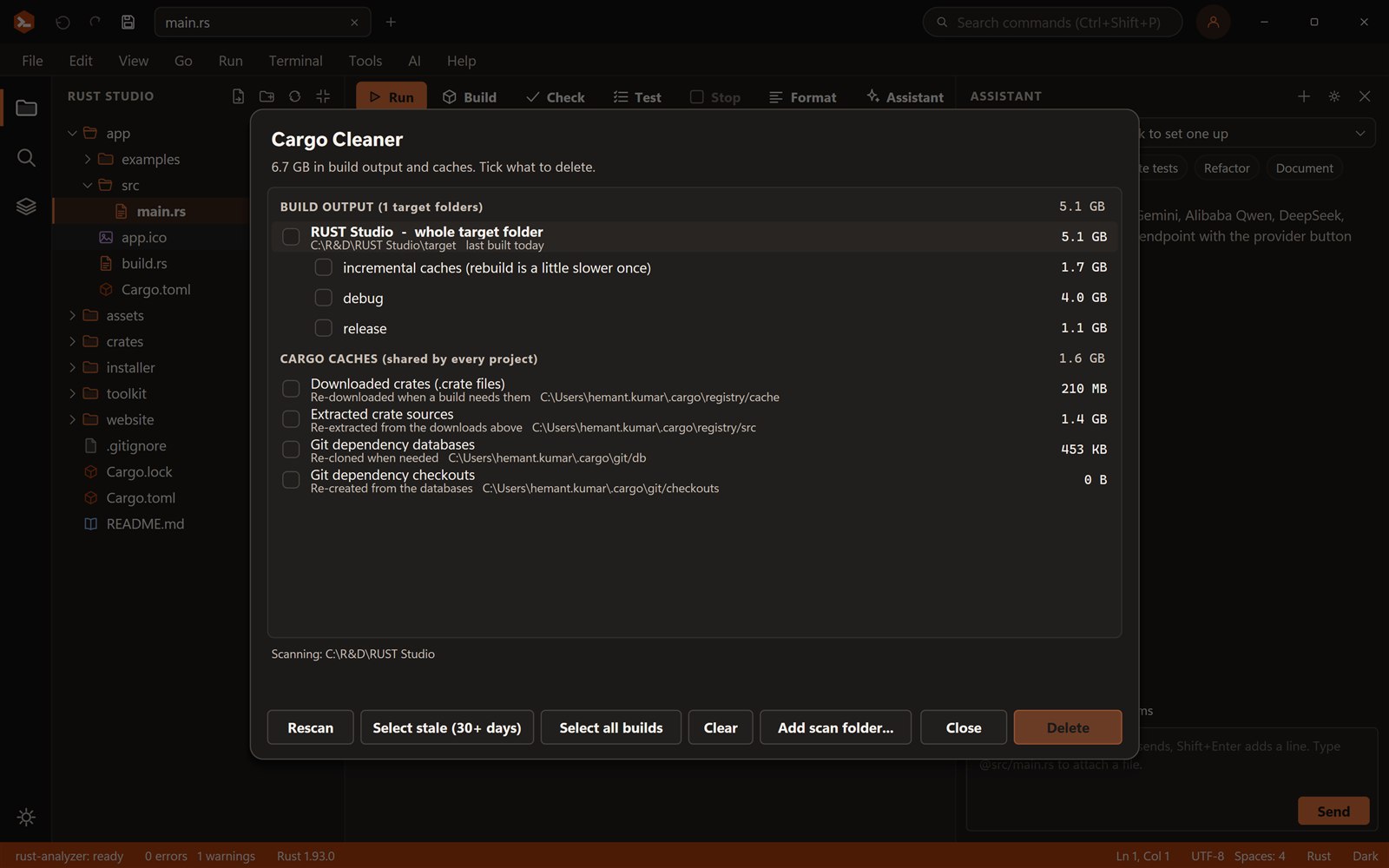
GUI toolkits produce large target folders. The Cargo Cleaner lists every target folder under your projects with its age, so you can clear the ones you have not built for a month in a few clicks.
Tauri if you want a web UI, Slint for a declarative native UI that also targets Android, egui for the quickest native tool UI. Rust Studio has a starter for each.
Yes. Extensions add templates for any toolkit, with settings such as where the SDK lives.
Yes. Rust Studio is free for personal and commercial use, with no account, trial or licence key. It is closed-source freeware.
Windows 10 and 11 (64-bit). You can build for Windows, the web and Android from it. iOS builds need a Mac with Xcode.
Rust Studio is a free, native Rust IDE for Windows: rust-analyzer, solutions with many projects, full-stack web templ…
Write native Android apps in Rust with Slint or egui, no web view. Rust Studio gives you templates, an Android setup…
Rust builds use gigabytes. The Cargo Cleaner in Rust Studio finds every target folder and cargo cache, shows size and…
Download Rust Studio, the free Rust IDE for Windows 10 and 11. Per-user install, no administrator rights, no account,…