F9
Breakpoints
Click the left margin or press F9. They are kept between sessions, listed in the Debug panel, and shown hollow when the debugger could not place one.
Set a breakpoint in the margin, press F5, and the program stops on that line with its call stack and variables. Step over, step into, step out, run to the cursor, or let it run on.
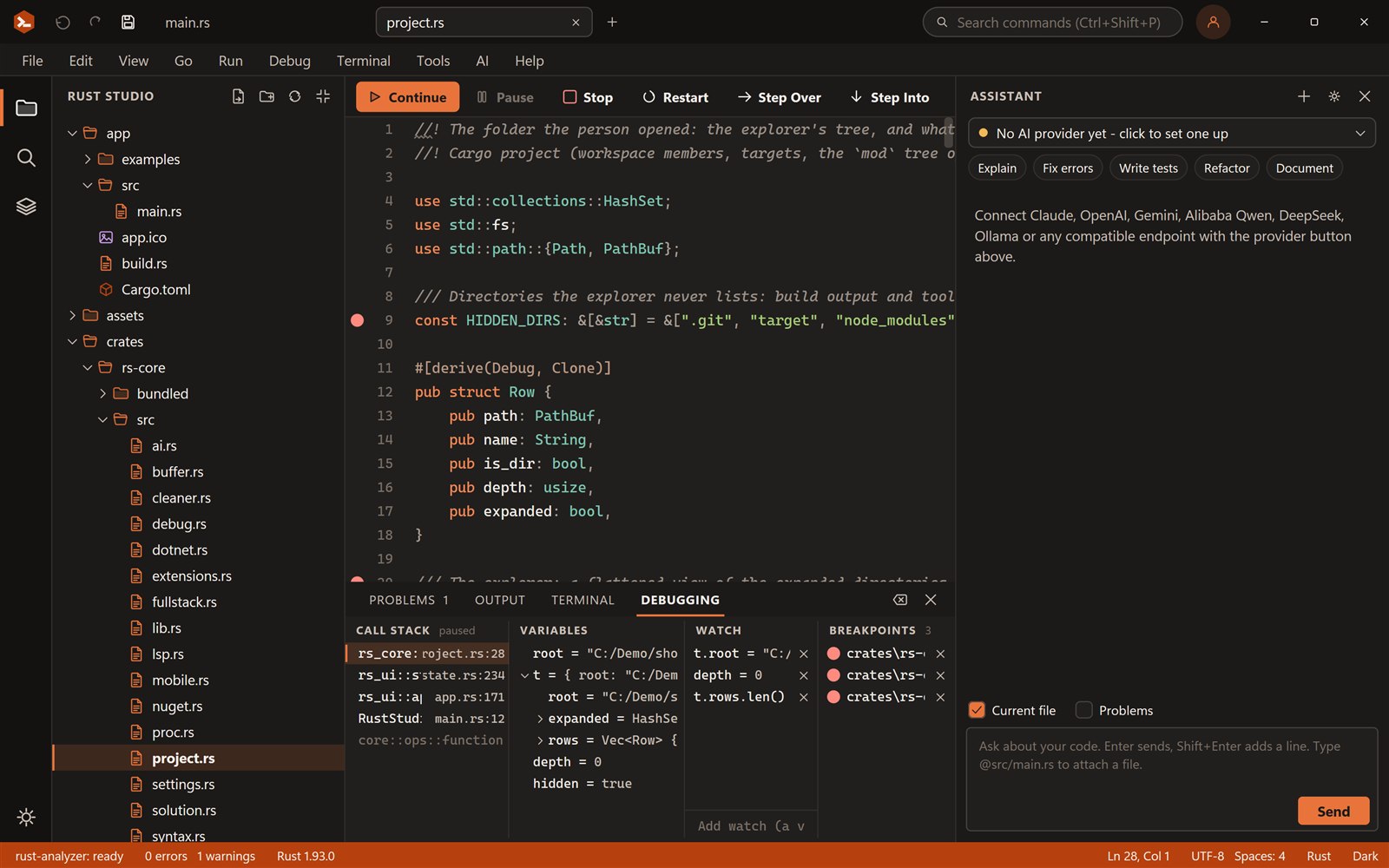
Click the margin to set breakpoints, press F5, then F10, F11 and Shift+F11 to step. The call stack, variables and watches follow.
fn square(n: i32) -> i32 { let result = n * n; result} fn sum_of_squares(limit: i32) -> i32 { let mut total = 0; for i in 1..=limit { total += square(i); } total} fn main() { let limit = 3; let answer = sum_of_squares(limit); println!("answer = {answer}");}Call stack
Press F5 to start.
Variables
Locals show while paused.
Watch
total = …Output
The program has not run.
Try it: press F5 (it stops on the red dots), then F10 over a call and F11 into it, watch total change, and finish with F5.
F9
Click the left margin or press F9. They are kept between sessions, listed in the Debug panel, and shown hollow when the debugger could not place one.
F5
F5 builds with cargo and starts the program under the debugger; at a stop it continues. Ctrl+F5 runs without debugging, as in Visual Studio.
F10 · F11 · Shift+F11
Walk the code a line at a time, dive into a call, or leave the current function. The yellow line and arrow show where you are.
Ctrl+F10
Put the caret on a line and run until the program gets there, without leaving a breakpoint behind.
Panel
Pick a frame to see its locals, expand structs and collections, and add watches for the values you care about.
Hover
While paused, hold the mouse over a variable or a path like self.items to see its current value.
Break all
Ctrl+Alt+Break stops a program that is running, wherever it is, and shows the stack.
Stop · Restart
End the session and the program with it, or rebuild and start again in one key.
Rust Studio drives lldb-dap, the debug adapter that comes with LLVM, through the Debug Adapter Protocol. It builds your startup project with cargo, starts the program under the debugger, and shows what the adapter reports in the editor and the Debug panel.
On Windows the MSVC toolchain gives the debugger PDB symbols, so breakpoints, locals and call stacks refer to your Rust source. Install LLVM once (it includes lldb-dap); Debug, Debugger Setup tells you what is found and lets you point at a different copy.
If you have debugged in Visual Studio, your fingers already know this: F5, F9, F10, F11, Shift+F11, Shift+F5 and Ctrl+F10 do the same here. Everything is also in the Debug menu and the toolbar, which switches to Continue, Pause, Stop, Restart and the three step buttons while a session is active.
It includes lldb-dap. Rust Studio finds it by itself, or you choose it under Debug, Debugger Setup.
Click the margin beside a line, or put the caret there and press F9.
The project is built, started under the debugger, and stops on the breakpoint.
F10 over, F11 into, Shift+F11 out. Look at variables, add a watch, hover a value, then F5 to continue.
It talks to lldb-dap, the debug adapter from the LLVM project, over the Debug Adapter Protocol. LLVM is free; its Windows installer includes lldb-dap.
Yes, LLVM (for lldb-dap) once. On some Windows builds lldb also needs Python 3.11 installed; Debug, Debugger Setup tells you if that is the case and lets you point at its folder.
Yes: F5 start or continue, Ctrl+F5 run without debugging, F9 breakpoint, F10 step over, F11 step into, Shift+F11 step out, Ctrl+F10 run to cursor, Shift+F5 stop, Ctrl+Shift+F5 restart.
Yes. F5 debugs the startup project of the solution, with its run arguments and environment, after building it.
Yes. Rust Studio is free for personal and commercial use, with no account, trial or licence key. It is closed-source freeware.
Windows 10 and 11 (64-bit). You can build for Windows, the web and Android from it. iOS builds need a Mac with Xcode.
Rust Studio is a free, native Rust IDE for Windows: rust-analyzer, solutions with many projects, full-stack web templ…
Build Windows desktop apps in Rust with Tauri, Slint or egui. Rust Studio gives you project templates, solutions, a o…
Build full-stack Rust web apps in Rust Studio: an axum backend with a React, Vue, Svelte or Angular front end, a dev…
Download Rust Studio, the free Rust IDE for Windows 10 and 11. Per-user install, no administrator rights, no account,…